Drive Atlas
// your drives, finally mapped

Every drive you own.
One quiet map.

Drive Atlas is a catalog of every drive you own. Search drives that are sitting on a shelf. See exactly what has no backup. Prove your backups are real. Built by a working timelapse photographer with a drawer full of drives.

Get Drive Atlas · $40 Download free · maps 2 drives
Windows and Linux, today. The free version maps your first 2 drives, forever. $40 once maps all of them. Mac is being signed now, coming soon.
Drive Atlas dashboard: every drive, backup coverage, and what needs attention
Pay once. $40.That is the whole business model. No subscription, no account, no upsells.
Zero network connections.The app cannot phone home. There is no code for it. Check the source of the page it renders, there is not a single URL in it.
No updater. It cannot nag you.Updates are a download you choose to make, about twice a year. Skip them all and the app keeps working.
Your files stay yours.The catalog lives in one local file on your machine. Nothing is uploaded, indexed remotely, or "synced".
01  /  Search

Find one photo from three years ago in five seconds.

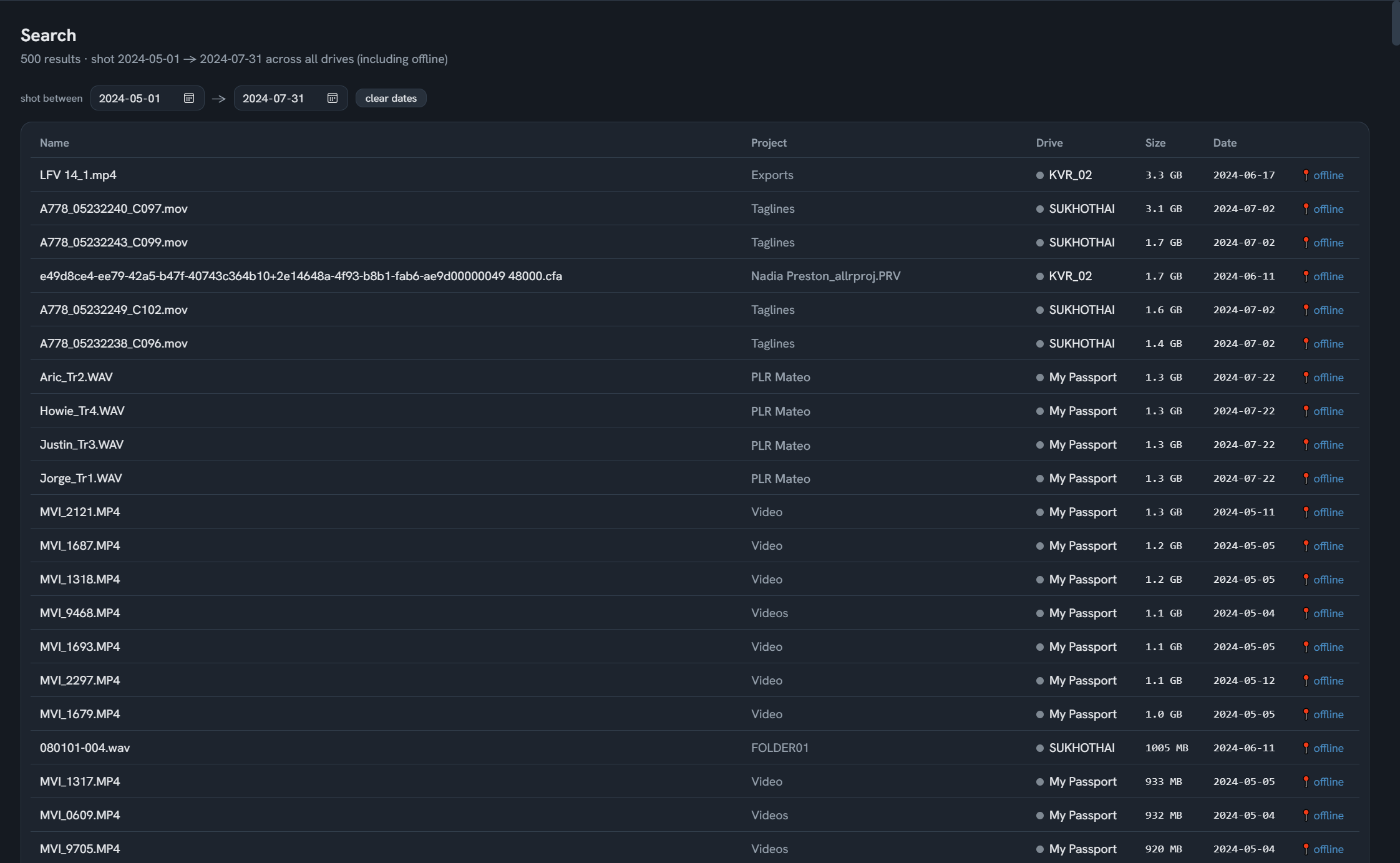
Every file on every drive is in the catalog, including drives in a drawer in another country. Search by name, project, or the thing photographers actually remember: when it was shot.

Pick a date range and see every file from that trip, biggest first, with the drive it lives on and where that drive is.

Date-range search finding files on drives that are not plugged in
02  /  Space map

See where the space went.

A treemap of any drive, drawn from the catalog. Big folders are big boxes. Click to zoom in, click a file to open it in Explorer.

Here is the part no other tool does: the map works for drives that are not plugged in. Study a drive on a shelf in Tokyo from a cafe in Berlin.

Space map treemap of a drive, zoomed into a folder
03  /  Verified backups

Backups you can prove, not just hope about.

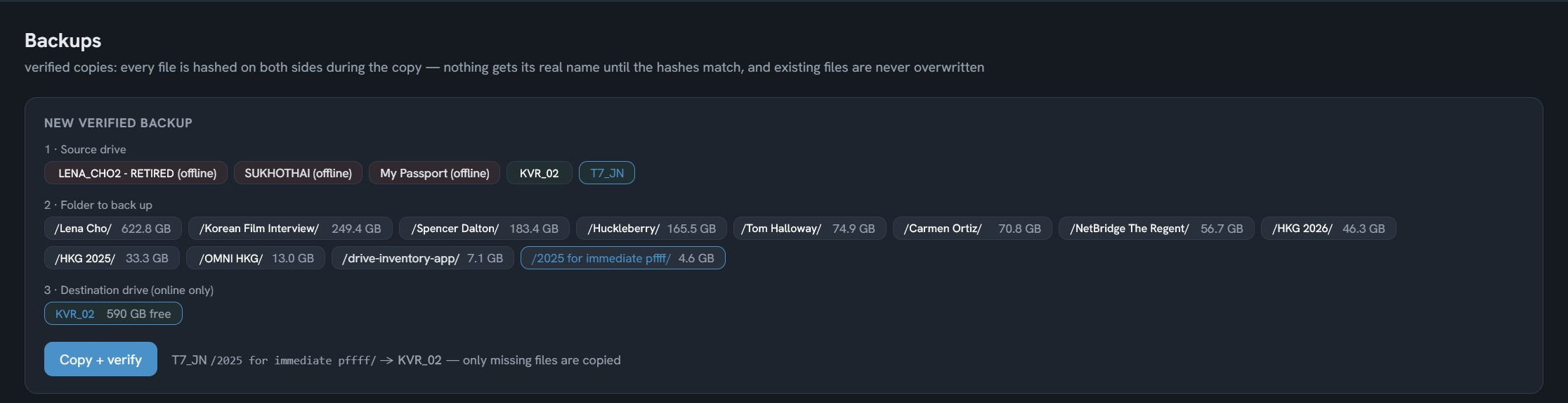
Pick a folder, pick a destination. Every file is hashed on both sides during the copy. Nothing gets its real name until the hashes match. A yanked cable can never leave a half file pretending to be a backup.

Re-verify any backup months later with one click. Run the same backup again and it only copies what is missing.

Verified backup: pick a folder, pick a destination, every file hashed on both sides
04  /  Duplicates

Delete with certainty, never on a guess.

Duplicates are found across all your drives, then verified byte for byte before anything moves. Deletion goes to the Recycle Bin, only after verification, and only the copies you did not mark as keepers.

It also spots a zip sitting next to a folder with the same name. You know why you made that zip. The app suggests trashing the archive, never the folder.
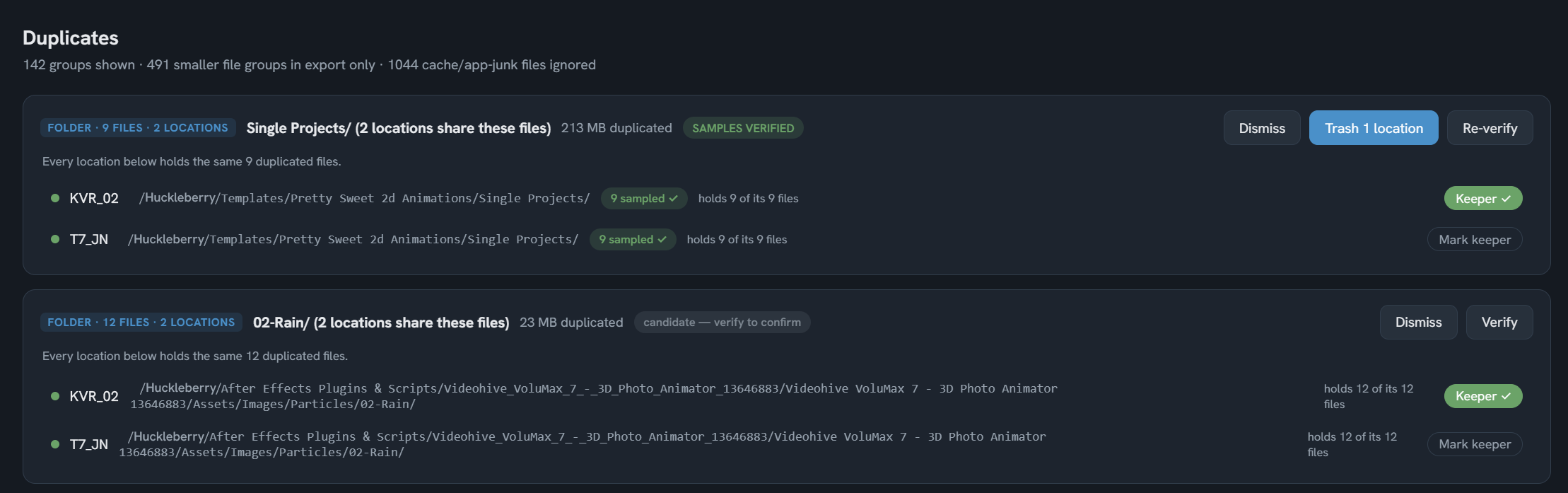
A duplicate group verified byte for byte, keeper marked, ready to trash the rest
05  /  Shoots

It knows a timelapse when it sees one.

Numbered frames in a folder could be a timelapse or a wedding. Drive Atlas reads the shooting rhythm from the files themselves. A timelapse is a metronome. A photo shoot is jazz.

Timelapses show their interval and steadiness, like "2.5s interval, steady 96%, first 7 frames off-rhythm, test shots?" You confirm with one click. Your call always outranks the app's guess.
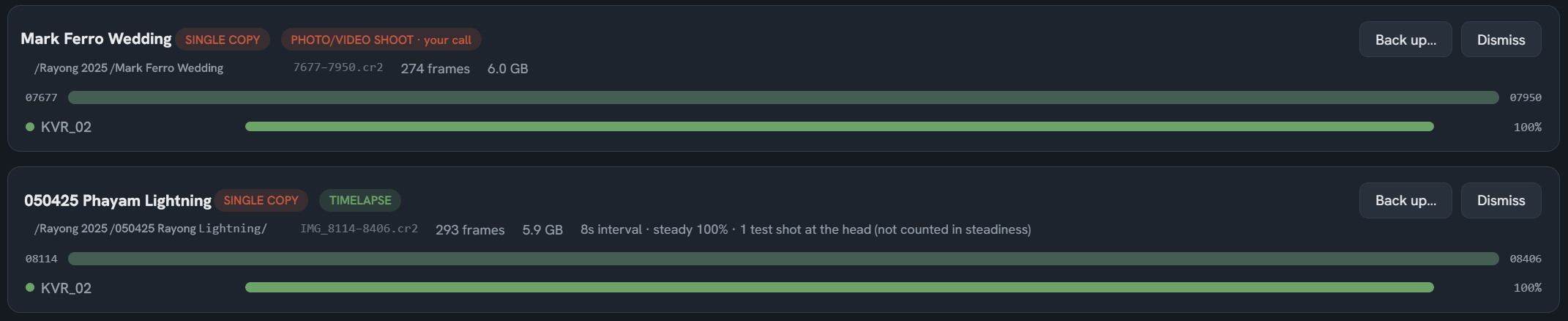
A timelapse card showing its interval and steadiness next to a photo shoot
06  /  Drive health

It caught a dying SSD that SMART called healthy.

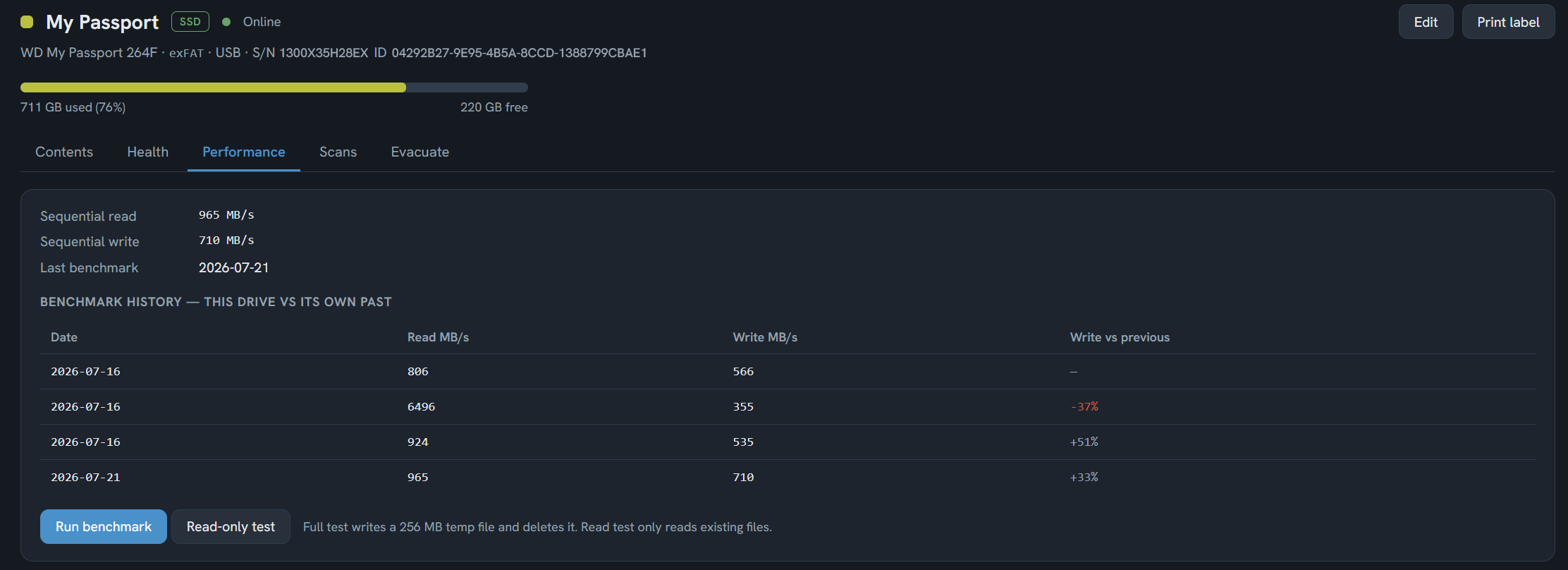
True story from development: a Samsung T7 passed every SMART check while its write speed had collapsed to 2 MB/s. The benchmark caught it. The manufacturer's own tool later confirmed it. The footage was evacuated in time.

Drive Atlas benchmarks your drives and remembers every result. A drive is judged against its own history, so an old slow drive is not "unhealthy", but a fast drive that halved is. If a drive is failing, the evacuation plan shows exactly what you would lose and where it fits.

Benchmark history: a drive judged against its own past, decline flagged
07  /  Shelf labels

Scan a QR on the shelf, know what is inside.

Print a label for any drive. The QR holds the drive's summary in plain text: capacity, free space, file count, top five folders by size, and where you said it lives.

No server, no app needed to read it. Any phone camera works, in a basement with no signal, in 2040.
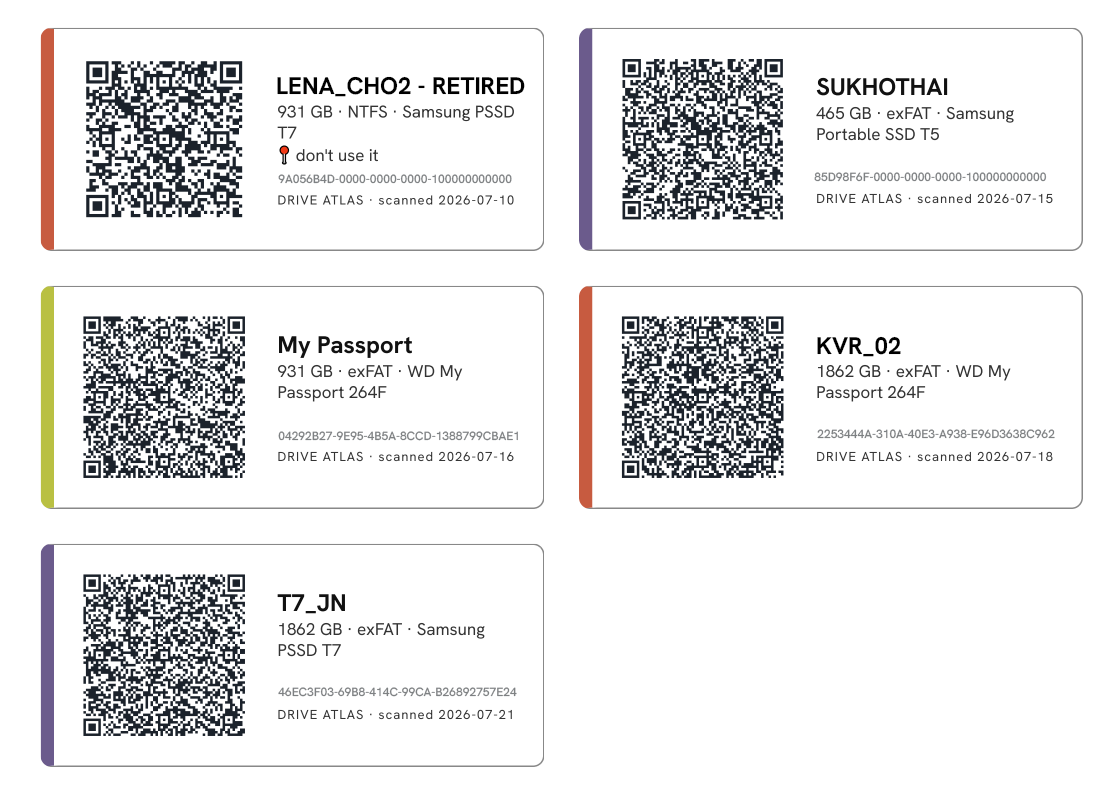
Printable QR shelf label holding the drive's full summary

"[Quote from the studio producer — ask about the update-fatigue chat and drive management across productions.]"

Producer, film studio

"[Quote from Andrew — ask about the treemap drill-down or catching things WinDirStat could not.]"

Software developer, Windows tester

"[Quote from Mac tester — ask about finding all his dongle drives and cleaning the 5TB.]"

Photographer, Mac tester
08  /  Pricing

One price. Everything. Forever.

$40
one time, that's it
  • Free version maps 2 drives, forever, no card, no timer
  • Every feature, no feature tiers, no pro version
  • All future updates free, forever
  • One license, one human, all your machines
  • Works offline forever, even if we vanish
  • 14-day refund, no questions, just email
Buy Drive Atlas
Windows and Linux today. Instant download, license key by email. The Mac build is being signed and is included in your purchase when it lands.
09  /  FAQ

Honest answers

Nothing shouts, nothing bounces, nothing is hidden in the fine print.

Will it nag me about updates?
It can't. There is no updater inside the app, no version check, no popup. We release about two updates a year. You download them if you want them. If you never update, your copy keeps working exactly as it does today. The one exception we allow ourselves: if a bug ever threatens your data, we ship the fix immediately.
Does it need the internet?
No. Never. Not to install, not to activate, not to run. The app makes zero network connections. This is not a setting, it is how it is built: there is no networking code in it. For an app that reads your entire archive, we think that should be the default, not a premium feature.
Is there a free version or a trial?
A free version, and it is not a trial: it maps your first 2 drives with every feature, forever. No timer, no countdown, no reminder popups. When you scan drive number three, the app asks for a license, once, right there. That is the only time it will ever bring up money.
How does the license work?
You get a key by email. You paste it into the app once. The key is verified on your machine, offline, using cryptography, and your name is inside it. One license covers one human on all their machines: desktop, laptop, the studio rig. It is not locked to hardware, because hardware dies and you should not have to email anyone about it.
What happens if Drive Atlas the company disappears?
Your copy keeps working, forever. Your license keeps verifying, forever, because it verifies inside the app, not on our servers. We do not have servers. Your catalog is a normal file on your machine. This promise is structural, not contractual.
Windows says "unknown publisher" when I install. Why?
Because we have not bought a code-signing certificate yet, and we would rather be honest about that than pretend. The warning means Windows does not recognize the publisher, not that anything is wrong. Click "More info", then "Run anyway". Signing is planned as sales fund it.
Where is the Mac version?
Being signed right now through Apple's developer program. Mac testers have been running Drive Atlas for weeks. When the signed build lands it is included in your purchase, not sold separately.
Will it handle my camera's files? CR3, BRAW, R3D...
Yes, and every format that comes after them. Drive Atlas never opens your image files, so it does not care what format they are. It catalogs names, sizes, dates, and folders. When your camera brand invents its next format, nothing breaks and you do not wait for an update.
Does it delete things by itself?
Never. Deletion only happens when you click it, only to the Recycle Bin, and only after the copies are verified byte for byte. It will never delete on a guess, and it has no "similar photos" fuzzy matching on purpose. Fuzzy guessing next to delete buttons is how people lose work. If you want perceptual matching, dupeGuru is free and good at it. We stay certain or we stay out.
Is this a culling tool?
No. Culling tools decide which photos deserve to live. Drive Atlas is the layer underneath: it makes sure the survivors exist in two verified places, on drives you can find. Photo Mechanic and friends do their job, we do ours.
Why don't the sizes match Finder exactly?
Two reasons, both boring and both fine. First, units: macOS Finder counts 1 TB as a trillion bytes, while Drive Atlas counts the way Windows does, in binary units. The same folder reads "1.09 TB" in Finder and "1017.8 GB" in Drive Atlas. Same bytes, two dialects. Second, file counts: macOS quietly writes hidden helper files onto external drives (.DS_Store and friends). Finder hides them from you. We count what is actually on the disk.
What do you collect about me?
Nothing. We cannot collect anything, the app has no way to send it. The store handles your payment (we never see your card). The only thing we ever have is the email your key was sent to.