Drive Atlas / Find files with no backup
Backups
Find out what has no backup, before a drive dies
Drive Atlas compares every file across every drive you own and lists the work that exists in only one place, biggest first.
The problem
Most people with a shelf of drives can't answer a simple question: do I have a backup of this? You think you copied that wedding to a second drive. Maybe you did. Maybe you copied half of it.
The only way to know is to compare every file on every drive, and nobody does that by hand.
How it works
- Scan your drivesOnce your drives are in the catalog, Drive Atlas compares them against each other. A copy on the same drive doesn't count as a backup.
- See the listThe dashboard shows how much of your work has no copy on any other drive. The full list sorts folders by size, so the biggest risk is at the top.
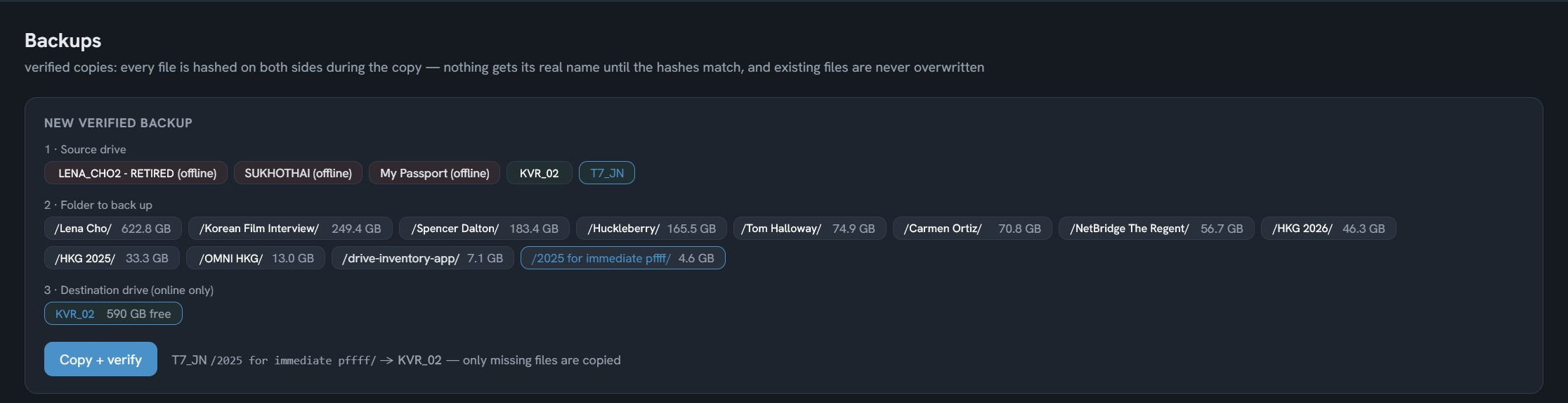
- Back it up and prove itPick a folder, pick a destination drive and press Copy and verify. Only missing files are copied. Every file is hashed on both sides during the copy, and existing files are never overwritten.
Good to know
Two copies in one room isn't safeTag each drive as home, studio or offsite. If every copy of something sits in the same place, Drive Atlas warns you, because a fire or a burglary takes both.
Re-verify any timeEvery backup the app made is listed with its date. Press Re-verify later to prove the copy is still good.
If a drive is failingEach drive has an evacuation plan: the folders on it that exist nowhere else, biggest first, so you know what to rescue first.
What it can't do
Drive Atlas only knows about drives it has cataloged. It can't see cloud backups or drives you haven't scanned, so a folder it calls unprotected may still have a copy somewhere it can't see.
Questions
How do I find files that aren't backed up?
Scan your external drives into Drive Atlas. It compares every file across them and lists the folders whose files exist on only one drive, biggest first.
How do I know a backup actually worked?
Backups made in Drive Atlas hash every file on both sides during the copy. A file only gets its real name once the hashes match, so a half-finished copy can't pass as a backup. You can re-verify it later.
Does Drive Atlas back up to the cloud?
No. It copies between your own drives and makes zero network connections. Keep your cloud backup if you have one. Drive Atlas is the inventory of what is on your shelf.
Free for your first 2 drives
Every feature included, no timer. $20 once maps all of them. Windows and Linux, no account, zero network connections.
Download freeBuy · $20