Drive Atlas / Clear app junk
Tools
Clear out the cache your editing apps left behind
Premiere, Resolve, Lightroom and After Effects leave cache files on every drive they touch. Drive Atlas finds them across all your drives and shows how much space each one holds.
The problem
Editing apps write cache next to your footage: media cache files, audio peak files, render caches, previews and proxies. None of it is your work, and it piles up on drives you haven't opened in years.
Finding it by hand means knowing every app's folder names and file types, on every drive.
How it works
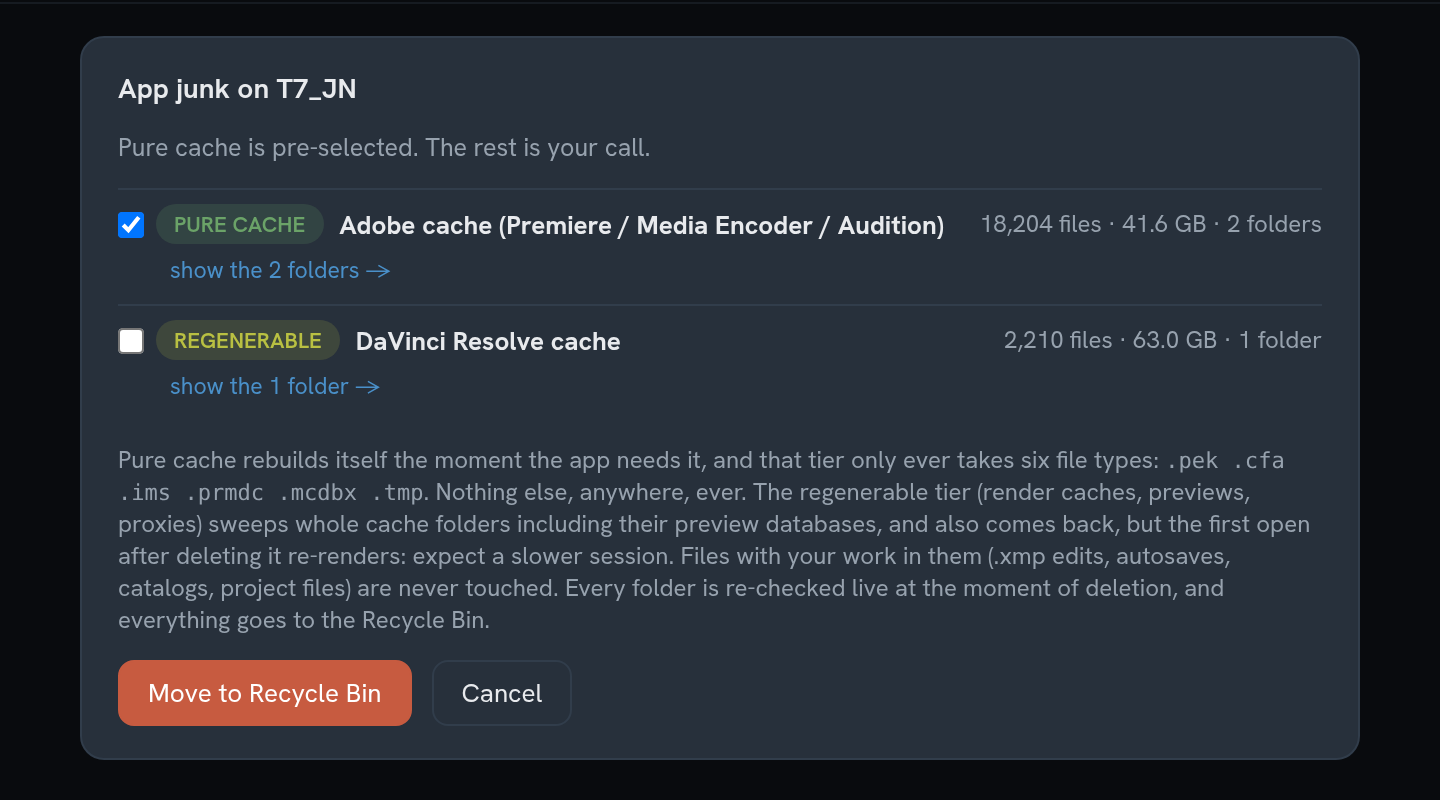
- See it per driveOpen Tools, then Clear app junk. Each drive shows how much pure cache and how much regenerable cache it holds.
- Review what will goPure cache is pre-selected. Render caches, previews and proxies are listed separately and left unticked, because deleting them means re-rendering later.
- Move it to the Recycle BinPlug the drive in and press Move to Recycle Bin. Every folder is checked again at the moment of deletion.
Good to know
Pure cache: safe to clearAdobe media cache and peak files rebuild themselves the moment an app needs them. This tier only ever takes six file types: .pek, .cfa, .ims, .prmdc, .mcdbx and .tmp.
Regenerable: your callLightroom previews, DaVinci Resolve cache and optimized media, Final Cut render files, After Effects disk cache and proxy media all come back, but you pay for it in render time. They are opt-in.
Your work is never on the listProject files, catalogs, sidecar edits, autosaves and backups are excluded, even when they sit inside a cache folder. That includes .prproj, .drp, .aep, .lrcat and .xmp files.
What it can't do
Cleaning needs the drive plugged in. The first time an app reopens a project after its cache is cleared, it rebuilds the cache, so the first session may be slower.
Questions
How do I delete the Premiere Pro media cache from an external drive?
Drive Atlas finds Adobe media cache and peak files on every drive in its catalog and sizes them per drive. Plug the drive in, review the list and move the cache to the Recycle Bin. Premiere rebuilds what it needs.
Is it safe to delete DaVinci Resolve cache files?
Yes, Resolve can rebuild its render cache and optimized media, but it takes time. That is why Drive Atlas lists Resolve cache as regenerable and leaves it unticked by default.
Will it delete my project files?
No. Project files, catalogs, autosaves, sidecar edits and backups are excluded from the list, even inside cache folders.
Free for your first 2 drives
Every feature included, no timer. $20 once maps all of them. Windows and Linux, no account, zero network connections.
Download freeBuy · $20