SMART said healthy. The drive was dying.
Drive Atlas speed-tests each drive and compares it to that drive's own history. When the numbers fall, it tells you, even if SMART still says everything is fine.
The problem
SMART is the health report built into every drive. It's useful, but many USB enclosures hide most of it, and drives can fail without SMART noticing.
Drive Atlas was built by a photographer whose own Samsung SSD tested at 2 MB/s writes while SMART called it healthy. Copying one 2.4 GB clip to it took 21 minutes.
How it works
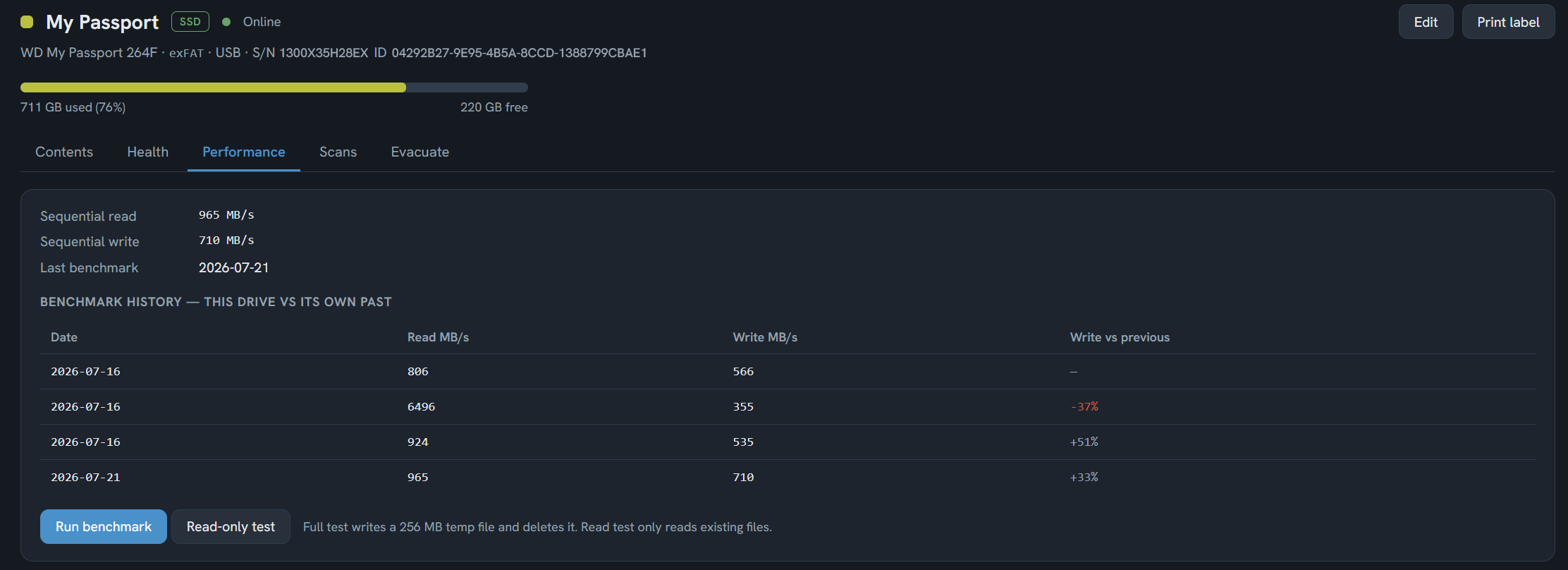
- Run a speed testPress Run benchmark on a plugged-in drive. The full test writes a 256 MB temp file and deletes it when it is done. The read-only test only reads files already on the drive.
- Build a historyEvery result is saved. The drive's Performance tab shows each test next to the one before it, so you see the trend, not just one number.
- Act on the warningWhen a drive slows down sharply against its own past, it is flagged on the dashboard. A drive that writes slower than 10 MB/s is treated as failing whatever its label says. The evacuation plan lists what to copy off first.
Good to know
What it can't do
A speed test is a warning sign, not a lab diagnosis. A slow result can also come from a slow cable or hub, so test again before you panic. Drive Atlas can't repair drives.
Questions
My SSD is very slow but SMART says it's healthy. Is it failing?
How does Drive Atlas check drive health?
Does the speed test write to my drive?
Free for your first 2 drives
Every feature included, no timer. $20 once maps all of them. Windows and Linux, no account, zero network connections.
Download freeBuy · $20