Drive Atlas / Which copy to grab
Search
The same file is on four drives. Which one do you grab?
Years of backups mean the same footage lives in several places. Drive Atlas ranks the copies and says, in plain words, which one to go get.
The problem
Finding a file is only half the job when it exists on four drives. One of them is plugged in already. One is slow. One might be dying. One sits at a relative's house.
Without help you pick one at random, and it is usually the slow one.
How it works
- Search as usualType the file name. When the same file exists on several drives, the copies are grouped together in the results.
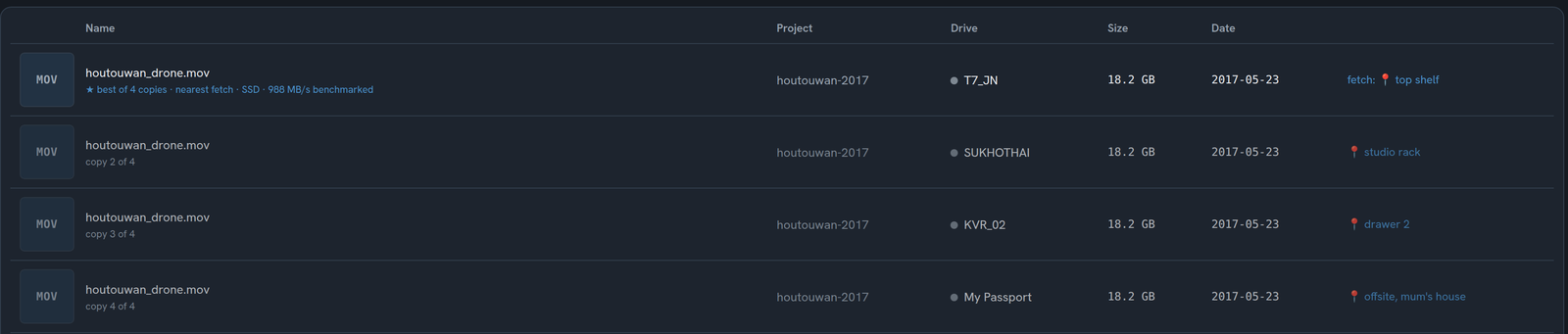
- Read the reasonThe best copy is marked with a star and a short reason, for example: best of 4 copies, plugged in, SSD, 988 MB/s benchmarked.
- Fetch or openIf the best copy is on a drive that isn't plugged in, the row tells you where to find it, like "fetch: top shelf." Plug it in and the same row changes to Open.
Good to know
How copies are rankedA copy you can open right now beats one you have to fetch. A healthy drive beats one the app has flagged. A faster drive beats a slower one, using each drive's own speed test. An SSD wins a close call. If two copies are otherwise equal, the newest one wins.
It warns you about dying drivesA drive flagged as failing or retired ranks below healthy drives that are just as easy to reach. If the copy it picks is on a failing drive, the row carries a warning, so you can rescue it first.
Two drives, same nameIf you own two drives with the same name, the advice tells them apart by capacity and serial number, so "go get My Passport" never points at the wrong one.
What it can't do
A drive you have never speed-tested is treated like an ordinary USB drive until you run its benchmark. Location notes are whatever you type, so the shelf advice is only as good as your labels.
Questions
I have the same file on several hard drives. Which copy should I use?
Drive Atlas ranks them for you: a copy on a plugged-in drive first, then healthy drives over flagged ones, then the fastest drive by its own speed test, then SSD over spinning disk. The best copy is marked with the reason.
Does it know where my unplugged drives are?
It knows what you tell it. Each drive can carry a location note like "top shelf" or "offsite." The search result then tells you where to walk to.
Does it use the internet to decide?
No. The ranking uses only your own catalog: which drives are plugged in, their speed test history and their health. Nothing leaves your computer.
Free for your first 2 drives
Every feature included, no timer. $20 once maps all of them. Windows and Linux, no account, zero network connections.
Download freeBuy · $20